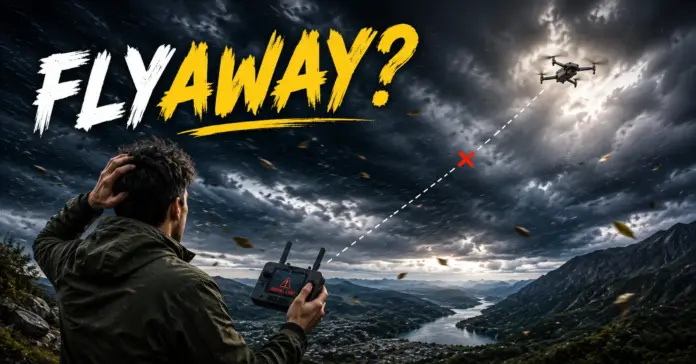

Your drone is in the sky doing great. Next thing you know, the video stream from your drone freezes. No connection anymore; no sign of your drone.
What has happened?
It’s quite natural for the pilot to jump to conclusions that the drone must have crashed or been lost forever. More often than not, things aren’t this bad.
DJI drones store valuable data about the flight, know the previous GPS location, and even have some functions to find the drone back. In case it still can’t be found, the company offers the special service that investigates the case and finds out the best way of solving it.
And the whole point is in the ability to react properly in the first minutes after the flyaway.
In this article, we are going to discuss what a DJI drone flyaway is, how to look for it, the process of the DJI Flyaway Service, and how to prevent flyaways in the future.
Table of Contents
What is DJI Drone Flyaway?
It refers to an occurrence whereby the aircraft loses connection unexpectedly while in flight and cannot be located by the pilot.
This is not to imply that the drone has lost its control on its own. Simply, it has become lost during its flight, and it becomes impossible for one to know where it is.
Causes of a flyaway can be the following:
- Lack of signal
- GPS interferences
- Compass problems
- Strong winds
- Low battery power
- Human mistakes
- Hardware issues
- Software complications
- Going out of transmission distance
The drone can come back to earth without any trouble upon triggering Return-to-Home or emergency landing mode. At times, it lands in areas that one cannot locate.
What Do You Need to Do after Your DJI Drone Flyaway?
Those first few minutes are crucial.
Remain calm and do not act rashly. Instead, consider these actions.
1. Open the Find My Drone tool.
DJI offers a Find My Drone tool within their mobile apps.
This feature is available via one of the following based on your aircraft:
- DJI Fly
- DJI GO 4
- DJI Pilot
- DJI Pilot 2
- DJI GO
The information available includes:
- Current location
- Location of the drone before the flyaway
- GPS coordinates
- Flight route
You may view the coordinates in other map tools.
2. Search the Surrounding Area Carefully
If the drone is near its last location:
Move slowly toward the GPS coordinates.
Search on trees, rooftops, bushes, fields, and any buildings near the drone.
Be sure to listen for sounds.
Search thoroughly but do not put yourself in any kind of danger.
But in case the airplane has crashed somewhere dangerous, like deep water, mountains, cliffs, and other dangerous constructions, DJI recommends not taking any risks during the search procedure.
3. Use Flashing and Beeping
In case your drone is still attached to the remote control unit, then you can utilize the function of starting flashing and beeping.
The drone will be flashing the LEDs and making beeping noises.
As a result, you can easily locate your drone even in grass, forests, or low light.
It becomes easier for the user to locate the aircraft with the help of this feature.
Remark: You can use this feature of flashing and beeping in DJI Fly and DJI GO.
3. Don’t Delete Your Flight Logs
One of the most common mistakes pilots make.
Delete the DJI application.
Clean app data
Delete flight logs.
The flight logs have important flight information that DJI may require for analysis in the review of your flyaway incident.
What If You Cannot Find Your DJI Drone?
In case your search comes out empty-handed, you have the opportunity to make a request through DJI Flyaway Service.
It enables DJI to investigate the matter by means of your flight information and select the right service for you.
Steps Involved in Using DJI Flyaway Service
The process is easy and meant to make life easier for the pilot.
Step 1 – Provide Details of Flyaway Case
The details include:
- Serial number of the aircraft
- Account name
- Date of incident
- Incident description
Step 2 – Upload Logs
The flight log for the day the incident occurred must be uploaded.
DJI will use this data to examine the behavior of the plane prior to losing communication.
Step 3 – Analysis of Your Case
The engineers at DJI will look at the:
- Flight logs
- GPS data
- Sensor data
- Error messages
- Status of the plane
If all required information has been provided, it will take 2-3 days to get the review done.
Step 4 – Get a Service Solution
The investigation being complete, you will receive the available service option from DJI.
If a replacement is possible, you will get a quotation on the replacement charge.
Step 5 – Make Payment
Accept the quotation and make the payment.
Step 6 – Replacement Airplane Sent by DJI
On payment being made, DJI will prepare and send your replacement airplane.
DJI takes care of the shipment cost for Flyaway Service cases.
Information Needed for Flyaway Report
The following pieces of information should be prepared before you report the flyaway.
- Aircraft serial number
- DJI user name
- Date of the incident
- Details of what occurred
- Uploaded logs of the flight
Accurate information will help DJI handle your request faster.
What Do You Do if You Retrieve the Drone?
Sometimes pilots find their drones even after declaring them.
Should this occur before DJI completes the replacement process, notify DJI Support at once and cancel the flyaway case.
In case DJI has completed the replacement process, the drone found is normally owned by DJI and must be returned.
How To Prevent DJI Drone Flyaways?
Even though all flyaways cannot be prevented, practicing proper flight procedures makes one much less likely to experience a problem.
Wait for a good GPS lock.
Don’t start your flight hastily.
Make sure that the drone gets sufficient GPS satellite lock and updates the Home Point.
Check the home point
Make sure that the Home Point is properly set before taking off the drone.
It will guarantee correct behavior during the return.
Check the Weather Conditions
High winds are one of the most common causes of losing a drone.
Do not fly in weather conditions when the drone exceeds its capacity.
Maintain Visual Contact With Your Drone
It will help you to react fast if any problem occurs unexpectedly.
Avoid flying beyond the hills, buildings, and trees, which could disrupt the signal.
Have Enough Battery For Return
Do not use your battery until it reaches its capacity.
Always keep some spare capacity to ensure the return journey is safe.
Update Firmware
Keep your drone and the remote control up-to-date with the latest firmware versions.
Fly Away From Interference Sources
Do not take off from places such as:
- High-Voltage Lines
- Metal Buildings
- Radio Towers
- Airports
- Restricted Airspace
Useful Accessories to Help Prevent Flyaways
While useful drone accessories can’t guarantee that you will not have a flyaway, they may enhance safety and make it easier to recover the aircraft.
High Visibility Drone Skin
Bright skins help to locate your aircraft easier following an emergency landing.
Anti-Collision Strobe Light
Strobe lights enhance visibility at a distance and during poor weather conditions.
Landing Pad
The landing pad keeps dust and debris away from the drone sensors during takeoff and landing.
Intelligent Flight Battery Backup
Backup batteries reduce the risk of continuing flight with dangerously low battery levels.
Drone Carrying Case
A good carrying case helps to protect the aircraft, antennas, propellers, and sensors before each flight.
Propeller Holders
Propeller holders protect your blades against bending and damage during transportation.
Frequently Asked Questions (FAQs)
1. What is a DJI drone flyaway?
A DJI drone flyaway is a situation where the aircraft becomes unreachable during flight and cannot be recovered immediately by the pilot.
2. Can I recover a lost DJI drone?
Yes. Start by using the Find My Drone feature to view the last known GPS location and search the area safely.
3. Should I delete the DJI Fly app after a flyaway?
No. Keep the app, flight records, and all related data. DJI may need these records during the investigation.
4. How long does DJI take to review a flyaway case?
DJI generally reviews complete flyaway cases within 2–3 working days.
5. What information is required to report a flyaway?
You’ll need your aircraft serial number, DJI account name, incident date, accident description, and uploaded flight records.
6. Does DJI replace every flyaway drone?
Not necessarily. DJI reviews each case individually and determines the available service solution after analyzing the flight data.
7. What happens if I find the drone after submitting a flyaway case?
Contact DJI Support immediately. If the replacement hasn’t been completed, the case can usually be canceled. If the replacement has already been processed, DJI may ask you to return the recovered aircraft.
Final Thoughts
A drone flyaway from DJI can be quite a stressful experience, but by remaining calm and proceeding according to the right procedures, one may find it much easier. By employing the Find My Drone tool, conducting an extensive yet safe search in the vicinity of the location from which the drone was lost, and keeping your flight documents handy for further investigations, you will be able to increase the chances of recovery of the device.
Of course, it is always better to avoid the problem of the flyaway than to have to handle it. By performing the necessary checks prior to the takeoff, ensuring the right GPS signal, taking care of the battery, and flying responsibly, one can avoid the loss of the device.